Newsletter automation for the draft, not the send
Newsletter automation in HeyNews picks fresh stories and writes each issue on your schedule, in your voice. You review it and send it.
14-day trial or 5 generated issues. HeyNews drafts, you review before sending.
What it is
Email platform automations, like a welcome series, send emails someone already wrote. HeyNews automates the writing: on your schedule, it picks fresh stories, drafts the issue in your voice, and saves it to Issues. Your email platform still sends it.
How newsletter automation works in HeyNews
- Choose a ready AI Writer
- HeyNews trains it on issues you have already sent, so drafts sound like you.
- Set the schedule
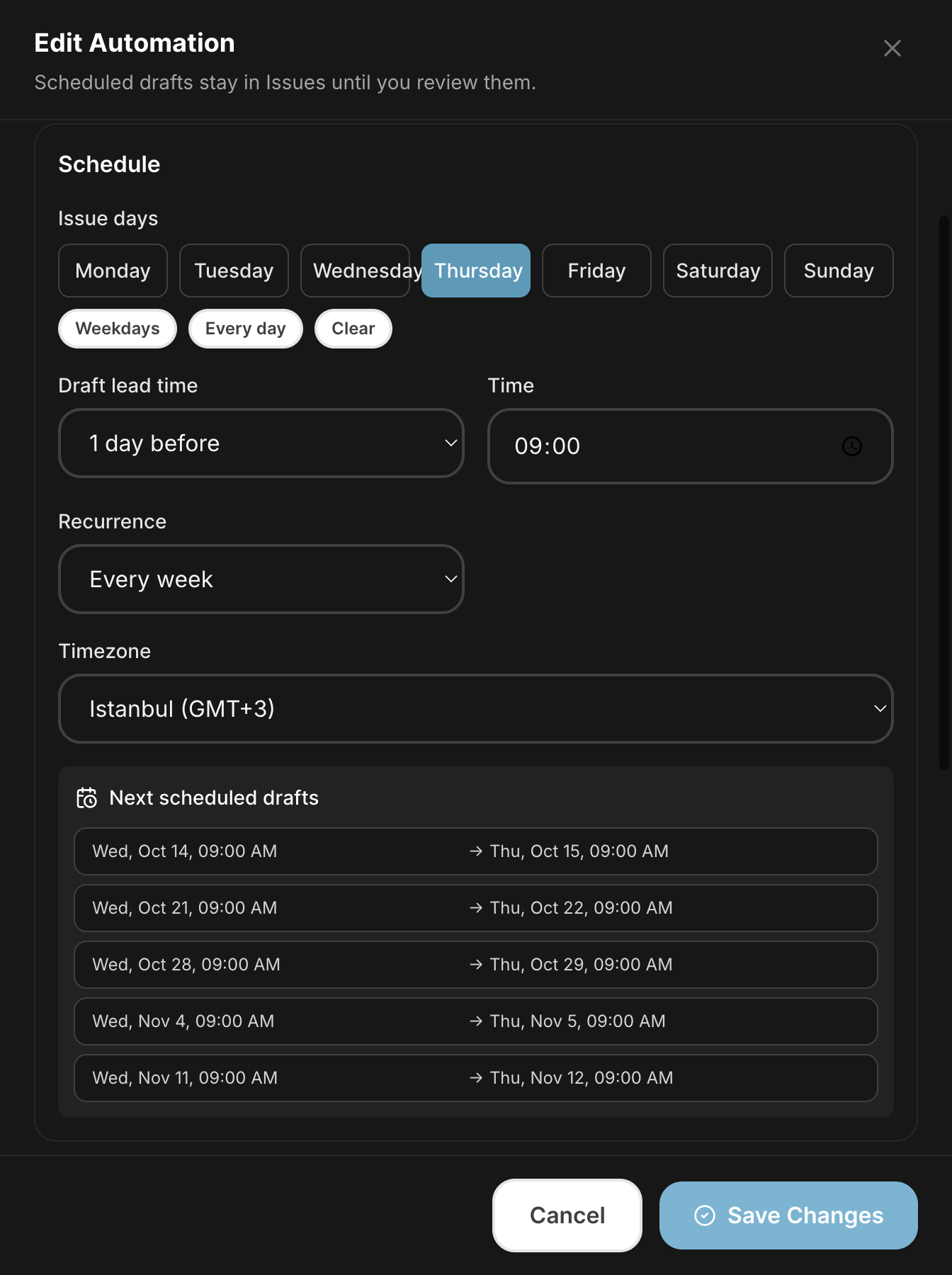
- Pick one or more issue days, a cadence from every week to every four weeks, a time, and a timezone. Drafts run on the issue day or up to six days before.
- Check the preview
- A calendar shows the next five draft times before you save.
- Set the story rules
- Choose minimum and maximum stories, a date window, and whether used stories can return.
- HeyNews writes the draft
- Smart Select picks the stories. Your AI Writer drafts the issue, subject line, and preview text, and saves it to Issues.
- You review and send
- HeyNews notifies you when the draft is ready or the automation needs attention. Edit it, then send.
What it does not do
Automated drafts are never sent or published automatically. If there are fewer fresh stories than your minimum, HeyNews skips the run and tells you. Repeated skips pause the automation. HeyNews retries temporary failures for up to 30 minutes before reporting one.
Where the draft goes
- beehiiv
- With a paid beehiiv plan, approved draft access, and beehiiv as the sending platform, a standard automation can also create each draft in beehiiv as an unsent post draft.
- Kit
- Copy the draft into a new Kit broadcast. HeyNews does not create Kit drafts.
- Any other platform
- Substack, Ghost, Mailchimp, and the rest: copy the draft into your editor.
Pricing
| Plan | Plan details | Price |
|---|---|---|
| Hobbyist | 5 issues / month · 1 publication · 5 AI revisions / draft | $39/mo |
| Starter | 15 issues / month · 2 publications · 10 AI revisions / draft | $99/mo |
| Pro | 45 issues / month · 4 publications · 20 AI revisions / draft | $299/mo |
| Team | 90 issues / month · 10 publications · 100 AI revisions / draft | $499/mo |
Use cases
The Monday roundup, drafted overnight
Pick Monday, or every weekday, and run the draft the night before. It is waiting in Issues when you start work.
The monthly company newsletter
Add the company blog and trade press, and run every four weeks. The draft lands a few days early so the team can edit.
FAQ
Does HeyNews send my newsletter automatically?
No. Automated drafts are never sent or published automatically. They wait in Issues until you review and send them.
How is this different from my email platform's automations?
Email platforms automate sending emails you already wrote, like a welcome series. HeyNews automates writing the issue. It drafts; your platform sends.
What happens if there aren't enough new stories?
HeyNews skips that run and tells you, rather than writing a thin draft. Repeated skips pause the automation.
Can I automate more than one newsletter?
Yes. Each publication has its own sources, AI Writers, and automations. Plans include 1 to 10 publications.
How is this different from building it in n8n or Zapier?
A DIY build chains a feed, a prompt, and a send step, and every broken link is yours to fix. HeyNews already has the story scoring, voice training, retries, and review step.
What is the free trial?
14 days or 5 drafts, whichever comes first.
Put next week's draft on a schedule.
Set up one automation and judge the first draft yourself.
Start your 14-day free trialBuilt by Cagri and Eren. We use HeyNews for our own newsletter.
Switching to HeyNews? See the AI newsletter generator
Related pages
Last updated .